

Event Planning in WhatsAPP. Improving the process of creating and keeping track of events in WhatsApp Group chats.


Role: UI/UX designer
Duration: 1 month
Tools: Figma/Figjam
Platform: Mobile App
Group chats must evolve

Using WhatsApp as our platform for communicating, my cycling team would endlessly post messages such as ‘when is the ride?’, ‘where are we meeting?’ or ‘what time?’. Messages would get lost in the long text thread, and planning them was a headache because there was no way to organize them with the exception of polls.
It’s such a pain to scroll through a chat trying to figure out when and where we are meeting. I wish there was a way to keep track of our events.
-User quote
There Must Be A Better Way
I researched other group chat apps to see if maybe something else could take the place of Whatsapp for our group. Most of the options I came across were either too clunky and awkward themselves (Slack, Discord, GroupMe), or simply not great for chatting (MSTeams).
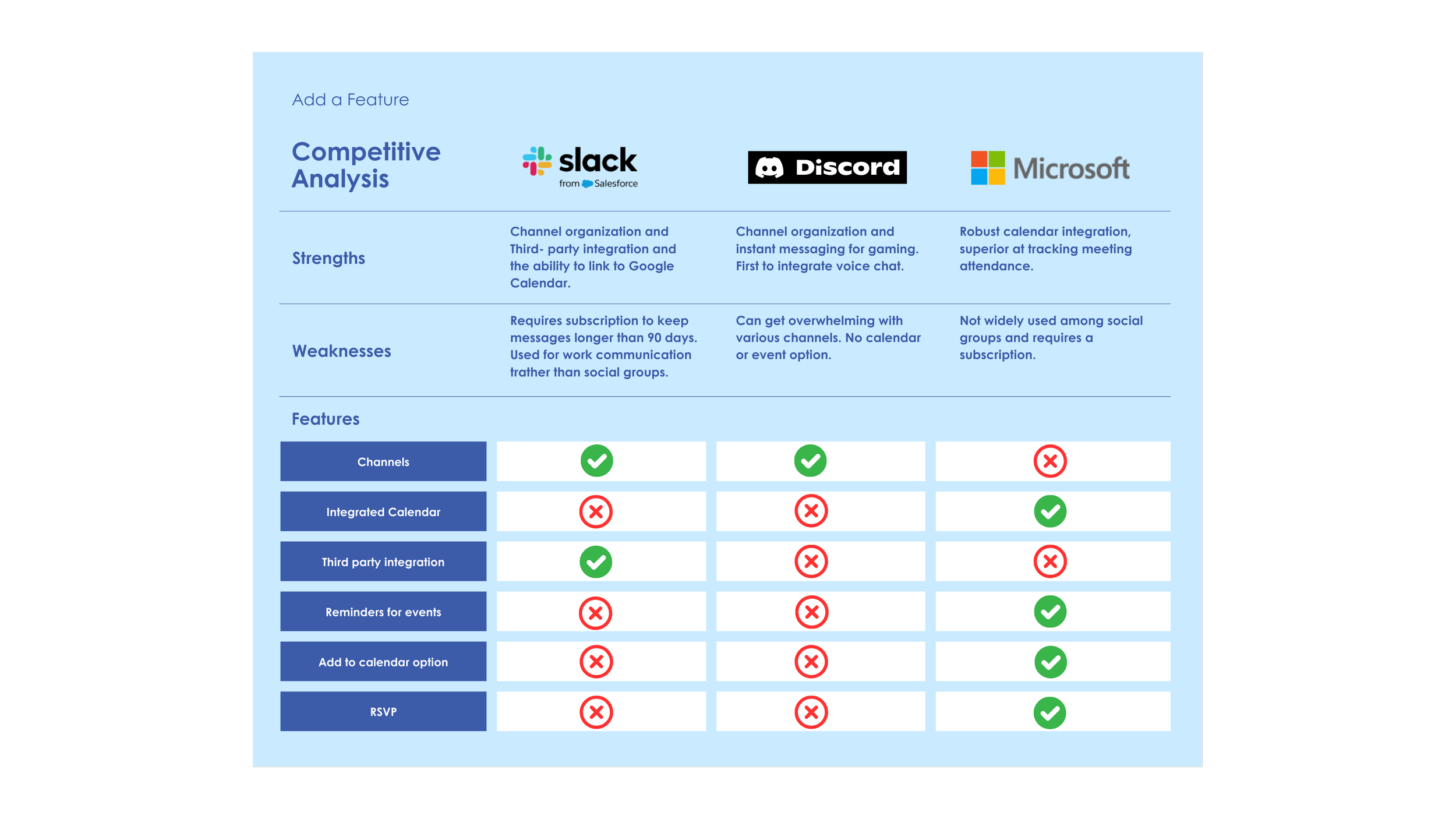
The right app - it’s just missing the right feature.
After realizing there wasn’t a better app for our group communication, I decided to just add the missing feature to WhatsApp. The problem was simple, and so was the solution:
Problem Statement:
How might we remind people of their events within WhatsApp so that they do not have to search endlessly for details or possibly miss the event entirely?
Questions and answers
To address the problem, I decided to add a feature to Whatsapp, asking the following questions: What makes WhatsApp difficult to use when planning events? How do people currently plan events in WhatsApp? How can we improve WhatsApp to make event planning easier? Are there any other issues that pop up when planning events on WhatsApp?

Improving event planning and tracking in Whatsapp
From the data I collected, I developed the project goals, which then helped me brainstorm ideas on how to incorporate an event feature. I then created an ideal user flow for how I imagined this feature to work and what my user experience would look like. It developed into a simple user flow and mid-fidelity prototype which was well received during user testing.

Mid-fidelity Wireframes
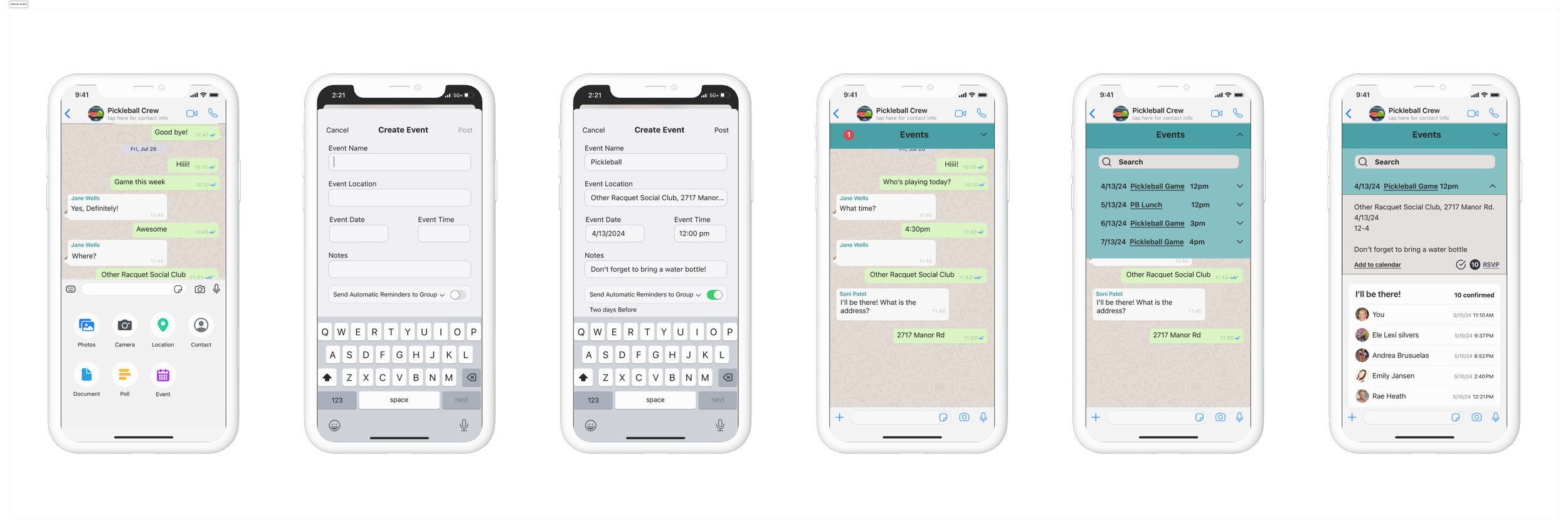
I designed a feature to allow users to add a group event that can be accessed from a pinned list, group info, and added to an external calendar with options to send automatic reminders.
Events can be accessed via the pinned list at the top, or by going to group info.
Ability to send automatic reminders to the group and specify when.
Can add to external calendar as well as view and change RSVP and see who is confirmed.
Add event feature is accessed via the + button.
Yellow represents added features

No more scrolling
The event feature focuses on allowing users to easily post and RSVP to events. An event calendar keeps track of group events and there is an option to send reminders to the group. My overall goal was to add a feature that would make it easier to plan, create, and keep track of events in WhatsApp and I accomplished that based on user testing results.
Reflection
There are so many times in my day to day life that I’ve thought “I sure wish I could do _____ on this app/website” so being able to define and find a solution to a problem that many users experience was extremely rewarding and satisfying. This project allowed me to see firsthand how a UX designer can improve existing apps and websites and gave me a glimpse of what it might feel like to work as a UX designer in the real world.
The similarities were striking, although I do feel that my version was more robust as it allows users to add more event details, control the reminders, share the event, and change the RSVP.
Shortly after I completed this project, WhatsApp added an event feature.

Current WhatsApp “add an event” feature
Added to WhatsApp about a month after I finished my project.
The Prototype
WhatsApp Add an Event Feature
(released after I completed the project)